![ted-green.png]](https://helpdesk.centercode.com/hs-fs/hubfs/images/logos/ted-green.png?height=50&name=ted-green.png)
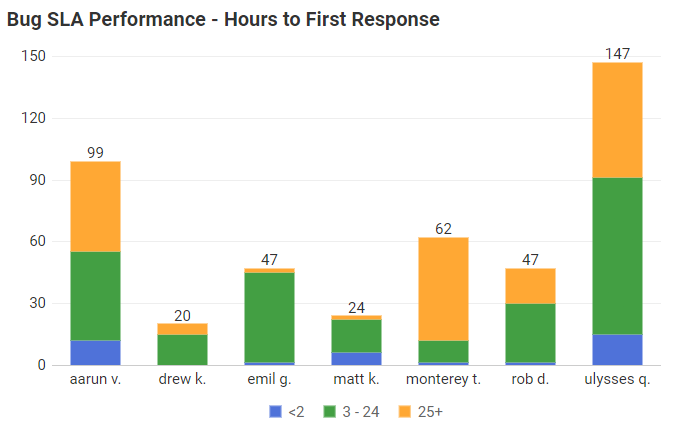
Centercode’s robust data engine offers the Feedback Performance Management dataset, focused on monitoring the ongoing health and effectiveness of feedback collection, ongoing triage, and management. Intended to monitor feedback triage or support team effectiveness, the Performance Management dataset provides detailed information on times and events surrounding First Response, Last Status Change, and Feedback Aging. We encourage you to use these metrics in your reports to keep an eye on your team’s performance to help identify any opportunities for improvement.
First Responders and Their Response Times
First Response
A “First Response” is the first time a team member changes the Status from its original status (typically New) to any other. The platform can now expose when the first response occurred, who the first responder was, time from submission to the first response, and time since the first response to the current status.
Examples of First Response Data
|
Data Criteria |
Description |
Example Value |
|
First Responder [Info] |
The user responsible for the first Status change |
Tony Fisher |
|
First Response Date |
Timestamp of a ticket’s first Status change |
Dec 1, 2017 @ 9:52 AM |
|
[Time] to First Response |
Time from original submission to first Status change |
12 (hours) / 1 (days) |
|
[Time] from First Response to Status |
Time from the first Status change to the feedback’s most recent Status change |
221 (hours) / 9 (days) |
[Info] includes Name, Username, and Email Address data; [Time] in Days or Hours
Last Status Change
The Last Status Change data criteria provide performance data around the most recent Status change including information on who most recently moved the ticket through Workflow (via Status change) and when.
Examples of Last Status Change Data
|
Data Criteria |
Description |
Example Value |
|
Last Changed User [Info] |
The user responsible for the most recent Status change |
Tony Fisher |
|
Last Status Change Date |
The timestamp of the most recent Status change |
Dec 5, 2017 @ 3:26 PM |
[Info] includes Name, Username, and Email Address data
Ticket Aging
Understanding how your feedback progresses through your Workflow and ensuring things aren’t Aging out is a critical part of maintaining tester engagement and SLA compliance. The Aging data set exposes time-based data regarding how long a ticket has taken to reach its current status, how long the ticket has existed, and how long it has been in its current Status.
Examples of Ticket Aging Data
|
Data Criteria |
Description |
Example Value |
|
[Time] Since Creation |
Total time from feedback submission to now |
342 (hours) / 14 (days) |
|
[Time] Since First Response |
Total time from the first Status change to now |
334 (hours) / 13 (days) |
|
[Time] Since Status Change |
Total time from the most recent Status change to now |
38 (hours) / 2 (days) |
[Time] format in Days or Hours
Locating Performance Management
Performance Management can be found within your Feedback Type (Bug Report, Suggestions, etc.) and can be used within your Reports. This dataset can also be leveraged as Dynamic Tags to be used in emails, as well.

The practical applications of these new criteria are nearly limitless, and we feel the possibilities open entirely new doors for team management and project dashboarding. Leveraging these data criteria for creative visualizations and applying strategic filtering will make efficient benchmarking of your team’s performance possible.